> ## Documentation Index
> Fetch the complete documentation index at: https://docs.regatta.dev/llms.txt
> Use this file to discover all available pages before exploring further.
# Introduction
> Deploy and operate RegattaDB on Kubernetes with the Regatta operator.
This section assumes you're already familiar with the [RegattaDB software modules](/self-hosted-deployment/manual-deployment/regattadb-software-modules) (SM, SNA, GDD, DCM, Sequencer, RDB) and how they work together in a RegattaDB deployment.
The **Regatta operator** is a Kubernetes controller that automates deploying and operating RegattaDB on Kubernetes. Instead of manually creating the Kubernetes resources RegattaDB needs, provisioning its storage, and issuing System Manager (SM) commands yourself, you describe the RegattaDB deployment you want in a single `RegattaCluster` resource and let the operator drive Kubernetes and RegattaDB into that state.
## Kubernetes Concepts You Will Use
| Concept | What it means for this section |
| ----------------------------------------------------------------------------------------------------------------------- | --------------------------------------------------------------------------------------------------------------------------------------------------------------------------------------------------------------------------------------------------- |
| [Pod](https://kubernetes.io/docs/concepts/workloads/pods/) | Where one or more RegattaDB modules run together; see [Deployment Architecture](#deployment-architecture) below |
| [Kubernetes node](https://kubernetes.io/docs/concepts/architecture/nodes/) | A physical or virtual machine that can run Pods. Kubernetes places Pods on nodes automatically |
| [StatefulSet](https://kubernetes.io/docs/concepts/workloads/controllers/statefulset/) | Keeps a fixed, ordered set of Pods running with stable identities and their own storage. The operator creates one StatefulSet for the SM Pod and one for the RDB Pods |
| [Service](https://kubernetes.io/docs/concepts/services-networking/service/) | A stable network name and address for one or more Pods, even as Pods restart or move between Kubernetes nodes |
| [`PersistentVolumeClaim` (PVC)](https://kubernetes.io/docs/concepts/storage/persistent-volumes/#persistentvolumeclaims) | A request for storage that Kubernetes binds to an actual storage volume or device |
| [Raw block volume](https://kubernetes.io/docs/concepts/storage/persistent-volumes/#raw-block-volume-support) | A storage device given to a Pod directly, the same way you would give RegattaDB a raw block device in a manual deployment, without a filesystem in between |
| [CustomResourceDefinition (CRD)](https://kubernetes.io/docs/concepts/extend-kubernetes/api-extension/custom-resources/) | Registers `RegattaCluster` (full name `regattaclusters.regatta.dev`, short names `regatta`/`rgc`, usable in place of `regattacluster` in `kubectl`) as a Kubernetes resource type, so Kubernetes can store, validate, and let the operator watch it |
| [`spec`](https://kubernetes.io/docs/concepts/overview/working-with-objects/#object-spec-and-status) | The part of your `RegattaCluster` resource where you write the state you want; only you (and the operator's own defaults) ever set it |
| [`status`](https://kubernetes.io/docs/concepts/overview/working-with-objects/#object-spec-and-status) | The part of your `RegattaCluster` resource where the operator reports the state it observed; never edit it yourself |
| [Operator](https://kubernetes.io/docs/concepts/extend-kubernetes/operator/) | The program that continuously watches your `RegattaCluster` resource and keeps Kubernetes and RegattaDB matching it |
## What the operator does for you
* **Describes your deployment as a single Kubernetes resource**: the `RegattaCluster` resource captures the RegattaDB version, image, module settings, storage, and resource sizing you want.
* **Creates and maintains the Kubernetes resources RegattaDB needs**: StatefulSets, Services, ConfigMaps, and storage claims, generated and kept in sync automatically.
* **Configures and starts RegattaDB for you**: once Kubernetes resources are ready, the operator configures RegattaDB modules and starts or stops RegattaDB through the System Manager (SM).
* **Reports readiness continuously**: Kubernetes and RegattaDB health are reflected in the `RegattaCluster` status, so you always know the current state.
## Deployment Architecture
In a manual or RDT-driven RegattaDB deployment, you decide which node runs which modules: one SM, one SNA on every node that hosts an operational module, one GDD, one DCM, one Sequencer, and one or more RDB modules. On Kubernetes, a **Pod** is the unit that runs one or more RegattaDB modules together, the same role a node plays in a manual deployment. The operator places modules for you, using the following default layout:
| Pod | Count | Modules running in this Pod |
| ------- | --------------------------------------- | ---------------------------- |
| SM Pod | One per RegattaDB system | SM, SNA, GDD, DCM, Sequencer |
| RDB Pod | One for every RDB replica you configure | SNA, RDB |
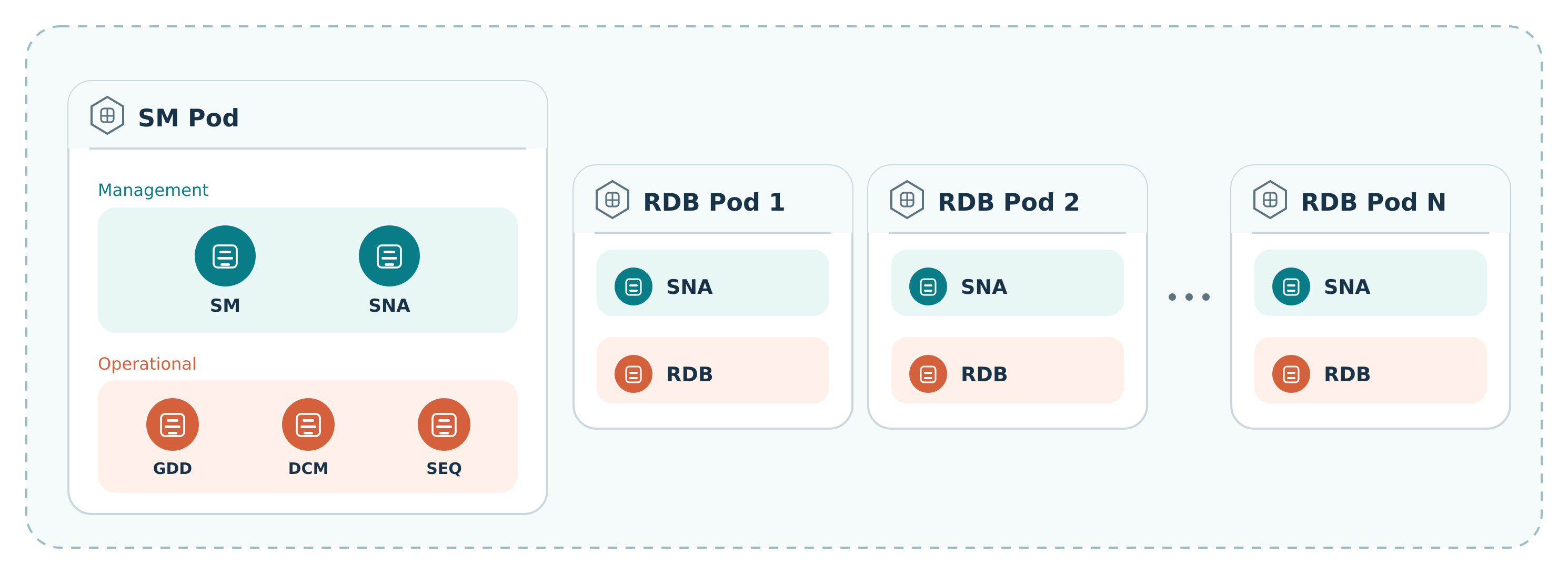
 Unlike a manual deployment, you do not choose per-Pod module placement here. The operator uses this default layout; the only placement decision you make today is how many RDB replicas to configure.
Each Pod also gets one or more stable Kubernetes Services, giving it a fixed network address, similar to assigning a fixed internal IP address to each node in a manual deployment. The SM Pod has one Service, and every RDB Pod has its own dedicated Service, so its address does not change even if Kubernetes moves the Pod to a different Kubernetes node.
A **Kubernetes node** is a physical or virtual machine in your Kubernetes cluster. It is a different concept from the node used in manual RegattaDB deployment guides: a single Kubernetes node can run many Pods at once, including Pods belonging to other applications, and Kubernetes decides which node each Pod runs on and can move a Pod to a different node later. You do not assign RegattaDB modules to specific Kubernetes nodes yourself, though you can influence which Kubernetes nodes the operator's Pods are eligible to run on using standard scheduling controls; see [Schedule Pods](/self-hosted-deployment/kubernetes/configuration/resources-and-scheduling#schedule-pods).
## How this section is organized
* **[Prerequisites](/self-hosted-deployment/kubernetes/prerequisites)** and **[Installation](/self-hosted-deployment/kubernetes/installation)**: what your cluster needs, and how to install the operator.
* [**Configuration**](/self-hosted-deployment/kubernetes/configuration/overview): the `RegattaCluster` spec reference, covering the object header, version and image, module settings, storage, networking, security and lifecycle, and resources and scheduling.
* [**Examples**](/self-hosted-deployment/kubernetes/examples/quickstart-single-node): end-to-end walkthroughs, from a single-node quickstart to static RDB storage.
* [**Operations**](/self-hosted-deployment/kubernetes/operations): how the operator keeps Kubernetes and RegattaDB in sync, reading status, and making supported changes.
* [**Troubleshooting**](/self-hosted-deployment/kubernetes/troubleshooting) and [**Release Notes**](/self-hosted-deployment/kubernetes/release-notes).
## Next steps
New to the Regatta operator? Start with [Prerequisites](/self-hosted-deployment/kubernetes/prerequisites) and
[Installation](/self-hosted-deployment/kubernetes/installation), then follow the
[Quickstart: Single-Node RegattaCluster](/self-hosted-deployment/kubernetes/examples/quickstart-single-node)
to deploy RegattaDB end to end.
Unlike a manual deployment, you do not choose per-Pod module placement here. The operator uses this default layout; the only placement decision you make today is how many RDB replicas to configure.
Each Pod also gets one or more stable Kubernetes Services, giving it a fixed network address, similar to assigning a fixed internal IP address to each node in a manual deployment. The SM Pod has one Service, and every RDB Pod has its own dedicated Service, so its address does not change even if Kubernetes moves the Pod to a different Kubernetes node.
A **Kubernetes node** is a physical or virtual machine in your Kubernetes cluster. It is a different concept from the node used in manual RegattaDB deployment guides: a single Kubernetes node can run many Pods at once, including Pods belonging to other applications, and Kubernetes decides which node each Pod runs on and can move a Pod to a different node later. You do not assign RegattaDB modules to specific Kubernetes nodes yourself, though you can influence which Kubernetes nodes the operator's Pods are eligible to run on using standard scheduling controls; see [Schedule Pods](/self-hosted-deployment/kubernetes/configuration/resources-and-scheduling#schedule-pods).
## How this section is organized
* **[Prerequisites](/self-hosted-deployment/kubernetes/prerequisites)** and **[Installation](/self-hosted-deployment/kubernetes/installation)**: what your cluster needs, and how to install the operator.
* [**Configuration**](/self-hosted-deployment/kubernetes/configuration/overview): the `RegattaCluster` spec reference, covering the object header, version and image, module settings, storage, networking, security and lifecycle, and resources and scheduling.
* [**Examples**](/self-hosted-deployment/kubernetes/examples/quickstart-single-node): end-to-end walkthroughs, from a single-node quickstart to static RDB storage.
* [**Operations**](/self-hosted-deployment/kubernetes/operations): how the operator keeps Kubernetes and RegattaDB in sync, reading status, and making supported changes.
* [**Troubleshooting**](/self-hosted-deployment/kubernetes/troubleshooting) and [**Release Notes**](/self-hosted-deployment/kubernetes/release-notes).
## Next steps
New to the Regatta operator? Start with [Prerequisites](/self-hosted-deployment/kubernetes/prerequisites) and
[Installation](/self-hosted-deployment/kubernetes/installation), then follow the
[Quickstart: Single-Node RegattaCluster](/self-hosted-deployment/kubernetes/examples/quickstart-single-node)
to deploy RegattaDB end to end.