> ## Documentation Index
> Fetch the complete documentation index at: https://docs.regatta.dev/llms.txt
> Use this file to discover all available pages before exploring further.
# Prepare for Deployment
## Deployment Planning
The first step is defining your deployment topology. The optimal topology depends on your workload profile, performance objectives, and storage requirements. RegattaDB supports a wide range of deployment configurations, allowing the system to be tailored to your specific requirements.
General deployment guidelines:
* Management Modules
* **SM** - Deploy a single SM module for every RegattaDB system
* **SNA** - Deploy one agent on every node that hosts at least one Operational Module
* Operational Modules
* **GDD**, **DCM**, **Sequencer** - Deploy one instance of each module per RegattaDB system
* **RDB** - Deploy at least one RDB module per RegattaDB system
Below are several common configurations.
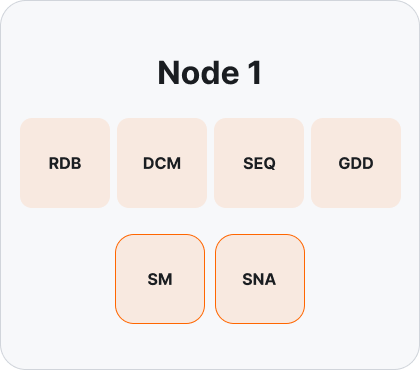
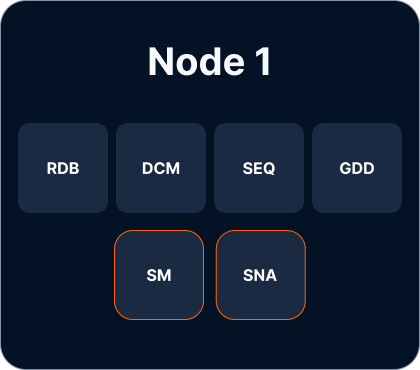
#### Single Node
A single-node deployment consists of a single server hosting all RegattaDB modules:
 #### Multi-Node – Classic
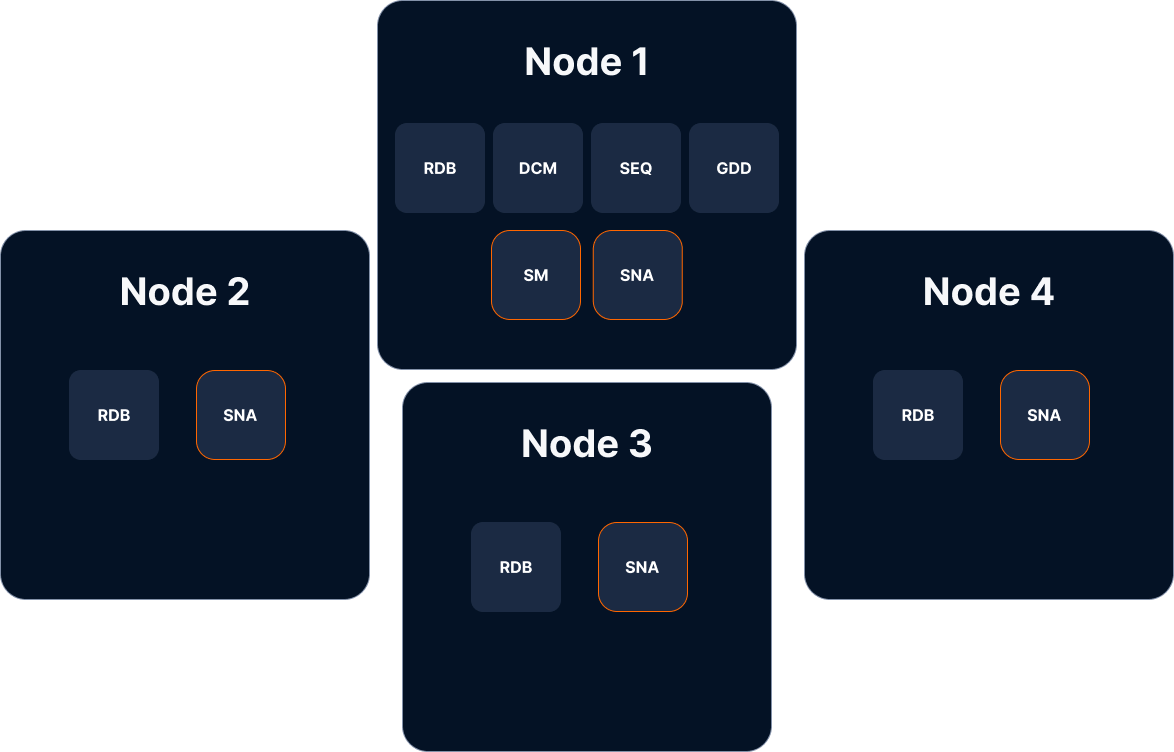
The most common multi-node deployment uses the following topology:
* One node hosts all RegattaDB modules, as in a single-node deployment.
* All additional nodes host both the **RDB** and **SNA** modules.
#### Multi-Node – Classic
The most common multi-node deployment uses the following topology:
* One node hosts all RegattaDB modules, as in a single-node deployment.
* All additional nodes host both the **RDB** and **SNA** modules.
.png?fit=max&auto=format&n=VuokPZuqXze_5IUL&q=85&s=2be8f9820e0ee34dd1421e5fb3be6693 "IMG 0280")
 For guidance on sizing and configuring your RegattaDB deployment, refer to **Best Practices** or contact Regatta Support for assistance.
### **Provision the Deployment Nodes**
Next, provision the nodes that will host your RegattaDB deployment, ensuring that each node meets the minimum hardware, storage, networking, and software [prerequisites](/self-hosted-deployment/prerequisites).
The exact hardware requirements depend on your deployment topology and workload characteristics. For guidance on sizing your deployment, refer to Best Practices or contact Regatta Support for assistance.
### Download the RegattaDB Software
Next, download the RegattaDB software package. RegattaDB is distributed as a set of RPM packages, each corresponding to a specific module or utility. Copy the required RPM packages to the nodes on which they will be installed according to your planned deployment topology.
The following example shows the contents of a RegattaDB software package.
#### Deployment Software
Each of the RPM packages below corresponds to one of the six RegattaDB modules.
```shellscript theme={null}
regatta-dcm-.el8.x86_64.rpm
regatta-gdd-.el8.x86_64.rpm
regatta-rdb-.el8.x86_64.rpm
regatta-sequencer-.el8.x86_64.rpm
regatta-sm-.el8.x86_64.rpm
regatta-sna-.el8.x86_64.rpm
```
### EULA Acceptance
Before deploying RegattaDB, you must read and accept the **Regatta End User License Agreement (EULA**). Acceptance of the EULA is integrated into the RPM installation process and is required before the installation can be completed.
* **Interactive installations** (for example, using `yum install` or `dnf install`) - You will be prompted to review and accept the EULA during installation
* **Automated installations** - Set the environment variable `ACCEPT_EULA=1` to indicate acceptance of the EULA and suppress the interactive prompt.
If you are using automated installation, we strongly recommend reviewing the EULA in advance. The latest version is available at:
[**https://regatta.dev/eula/**](https://regatta.dev/eula/)
### Install the RPM Packages
Install the required RegattaDB RPM packages using `yum` or `dnf`:
```shellscript theme={null}
sudo yum install regatta--.el8.x86_64.rpm
or
sudo dnf install regatta--.el8.x86_64.rpm
```
During installation, you will be prompted to review and accept the Regatta End User License Agreement (EULA):
```shellscript theme={null}
******************************************************************************
Regatta End User License Agreement (EULA)
URL: https://regatta.dev/eula/
******************************************************************************
To continue installation, type Y and press Enter.
To abort, press any other key and press Enter.
Accept EULA? [y/N]:
```
For unattended or automated installations, pre-approve the EULA by setting the `ACCEPT_EULA=1` environment variable:
```shellscript theme={null}
sudo ACCEPT_EULA=1 yum install regatta--.el8.x86_64.rpm
or
sudo ACCEPT_EULA=1 dnf install regatta--.el8.x86_64.rpm
```
All RegattaDB RPM packages are installed under `/opt/regatta/`. For convenience, you can use the `/opt/regatta/current` symbolic link to reference the current installation. The examples below show the installation directories for the **SM** and **RDB** modules.
**SM:**
```shellscript theme={null}
/opt/regatta/current/sm
├── bin
├── LICENSE
├── sm_1
│ ├── bin
│ ├── conf
│ ├── log -> /var/log/regatta/sm/sm_1
│ └── repo
└── tools
```
**RDB:**
```shellscript theme={null}
/opt/regatta/current/rdb
├── bin
├── LICENSE
├── rdb_1
│ ├── bin
│ ├── conf
│ ├── log -> /var/log/regatta/rdb/rdb_1
│ └── repo
└── tools
```
#### Additional RegattaDB RPM Packages
In addition to the RegattaDB software modules, the RegattaDB self-hosted package includes several utilities that simplify deployment, administration, backup, and troubleshooting.
The following RPM packages are included:
* Regatta Deployment Tool (RDT) - An automated deployment tool for provisioning and configuring RegattaDB. For detailed instructions, refer to the **Regatta Deployment Tool (RDT)** guide.
* Regatta Debug Tool - A Docker-based utility for connecting to running RegattaDB systems to perform live diagnostics, troubleshooting, and debugging.
* Regatta Bench - A benchmarking utility for executing preconfigured workloads against a RegattaDB system to evaluate performance and validate deployments.
```shellscript theme={null}
regatta-bnr-.el8.x86_64.rpm
regatta-rdt-.el8.x86_64.rpm
regatta-debug-.el8.x86_64.rpm
```
#### Client Software
The self-hosted deployment package also includes the RegattaDB client components. For installation and usage instructions, refer to [Drivers & Clients](/drivers-and-clients/connecting-applications-to-regatta).
The following RPM packages are included:
* Regatta Client Library
* Regatta CLI
* Regatta Connect - A collection of drivers, ORMs, and connectors for integrating RegattaDB with external applications, frameworks, and data platforms.
```shellscript theme={null}
regatta-cli-.el8.x86_64.rpm
regatta-client-.el8.x86_64.rpm
regatta-connect-.el8.x86_64.rpm
```
### Storage Devices
RegattaDB is designed to work directly with **raw block storage devices** to minimize filesystem overhead and achieve the highest possible storage performance. Direct access to raw devices allows RegattaDB to optimize data layout and I/O patterns specifically for database workloads.
#### Storage Requirements
Each **RDB** module must be assigned at least one storage device that is not used as the operating system boot device.
RegattaDB supports virtually any raw block storage device, including:
* Local NVMe devices (recommended for best performance)
* Local SSD devices
* SAN-attached block storage (Fibre Channel, iSCSI, etc.)
* Cloud block storage volumes (for example, Amazon EBS, Azure Managed Disks, or Google Persistent Disk)
* Shared block storage presented to the operating system as a raw block device
#### Using Filesystem-Backed Storage
Although direct raw block devices are recommended, RegattaDB can also use file-backed storage devices when raw devices are not available. In this configuration, a regular file located on a mounted filesystem is presented to RegattaDB as a storage device.
For example, the following command creates a sparse 1 TB file on an existing filesystem:
```shellscript theme={null}
sudo fallocate -l 1T /mnt/regatta_storage/rdb_device1.dat
```
The resulting file can then be registered as a storage device during deployment:
```sql theme={null}
MANAGE STORAGE DEVICE ADD (
NODE "Node01",
NAME "Node01_Disk1",
PATH "/mnt/regatta_storage/rdb_device1.dat"
);
```
While this approach is fully supported, direct raw block devices generally provide the best performance.
#### Persistent Module State
Each RegattaDB module maintains a small amount of persistent state under its repository directory:
```shellscript theme={null}
/opt/regatta/current///repo
```
For example, the repository for the first **RDB** module is located at:
```text theme={null}
/opt/regatta/current/rdb/rdb_1/repo
```
If required by your deployment, this directory may reside on persistent storage by mounting the desired storage device at the appropriate location.
#### Storage Permissions
The [deployment user](/self-hosted-deployment/manual-deployment-copied-1/prepare-for-deployment#deployment-user) must have read and write access to all storage devices used by RegattaDB.
For raw block devices, assign ownership to the deployment user and group before deployment:
```shellscript theme={null}
sudo chown : /dev/path/to/device
```
Repeat this step for each storage device assigned to RegattaDB.
### Deployment User
RegattaDB requires a deployment user with the appropriate ownership and permissions for the installation directories, shared memory, log directories, and storage devices.
The deployment owns the following resources:
* Regatta installation directory - `/opt/regatta` - created during RPM installation
* Shared memory directory - `/dev/shm/Regatta` - created automatically by RegattaDB at runtime
* Log directory - `/var/log/regatta` - created during RPM installation
* Storage devices allocated for RegattaDB
During installation, the RPM packages automatically create a default deployment user and group both named `regatta`. If you wish to use a different deployment user, follow these steps:
#### Installing with a Custom Deployment User
To install RegattaDB with a custom deployment user and/or group, set the `REGATTA_USER` and `REGATTA_GROUP` environment variables when installing the RPM package. Each RPM creates the OS user/group if it doesn't already exist, and applies ownership of its installed files to it.
`REGATTA_USER` and `REGATTA_GROUP` must:
* Not be empty
* Not be `root`
* Start with a letter or underscore, and contain only letters, digits, `.`, `_`, or `-`
If a value doesn't meet these requirements, the installation fails immediately with an error. If either variable is left unset, it defaults to `regatta`.
Use the same `REGATTA_USER`/`REGATTA_GROUP` values for every RegattaDB RPM you install. Each package independently resolves the account and applies ownership to its own files, so using inconsistent values across packages will leave some files owned by the wrong user/group.
**Example**
Given the following RPM packages:
```text theme={null}
regatta-cli-.el8.x86_64.rpm
regatta-client-.el8.x86_64.rpm
```
Install them with a custom deployment user and group, `myuser`/`mygroup`:
```bash theme={null}
sudo REGATTA_USER=myuser REGATTA_GROUP=mygroup yum install \
regatta-cli-.el8.x86_64.rpm \
regatta-client-.el8.x86_64.rpm
```
If `myuser`/`mygroup` don't already exist on the system, they are created automatically as a system account (no login shell, no home directory).
### IP Assignment
Assign IP addresses to each node in the RegattaDB cluster. Prepare a list of:
* **Internal IP addresses** used for communication between RegattaDB modules.
* **External IP addresses** used by client applications to access RegattaDB (if applicable).
**Note:** RegattaDB clients automatically use the external IP address when one is configured for a node. Otherwise, they fall back to the node's internal IP address.
Each RegattaDB module requires two ports:
* A **Communications Port**, used for communication between RegattaDB modules.
* A **Service Port** used for internal service operations.
By default, RegattaDB uses the port assignments shown below. We recommend using these default values unless your deployment requires otherwise (for example, when running multiple RDB modules on a single node).
| Module | Communications Port | Service Port |
| :-------- | :------------------ | :----------- |
| SM | 8840 | 5000 |
| SNA | 8841 | 5001 |
| Sequencer | 8842 | 5002 |
| GDD | 8843 | 5003 |
| DCM | 8844 | 5004 |
| RDB | 8850 | 6001 |
### Firewall Setup
Configure the firewall on each node to allow traffic on the required RegattaDB IPs and ports.
At a minimum, ensure that:
* The communications and service ports are accessible between all RegattaDB nodes.
* Client applications can access the required external endpoints, as defined by your deployment.
For guidance on sizing and configuring your RegattaDB deployment, refer to **Best Practices** or contact Regatta Support for assistance.
### **Provision the Deployment Nodes**
Next, provision the nodes that will host your RegattaDB deployment, ensuring that each node meets the minimum hardware, storage, networking, and software [prerequisites](/self-hosted-deployment/prerequisites).
The exact hardware requirements depend on your deployment topology and workload characteristics. For guidance on sizing your deployment, refer to Best Practices or contact Regatta Support for assistance.
### Download the RegattaDB Software
Next, download the RegattaDB software package. RegattaDB is distributed as a set of RPM packages, each corresponding to a specific module or utility. Copy the required RPM packages to the nodes on which they will be installed according to your planned deployment topology.
The following example shows the contents of a RegattaDB software package.
#### Deployment Software
Each of the RPM packages below corresponds to one of the six RegattaDB modules.
```shellscript theme={null}
regatta-dcm-.el8.x86_64.rpm
regatta-gdd-.el8.x86_64.rpm
regatta-rdb-.el8.x86_64.rpm
regatta-sequencer-.el8.x86_64.rpm
regatta-sm-.el8.x86_64.rpm
regatta-sna-.el8.x86_64.rpm
```
### EULA Acceptance
Before deploying RegattaDB, you must read and accept the **Regatta End User License Agreement (EULA**). Acceptance of the EULA is integrated into the RPM installation process and is required before the installation can be completed.
* **Interactive installations** (for example, using `yum install` or `dnf install`) - You will be prompted to review and accept the EULA during installation
* **Automated installations** - Set the environment variable `ACCEPT_EULA=1` to indicate acceptance of the EULA and suppress the interactive prompt.
If you are using automated installation, we strongly recommend reviewing the EULA in advance. The latest version is available at:
[**https://regatta.dev/eula/**](https://regatta.dev/eula/)
### Install the RPM Packages
Install the required RegattaDB RPM packages using `yum` or `dnf`:
```shellscript theme={null}
sudo yum install regatta--.el8.x86_64.rpm
or
sudo dnf install regatta--.el8.x86_64.rpm
```
During installation, you will be prompted to review and accept the Regatta End User License Agreement (EULA):
```shellscript theme={null}
******************************************************************************
Regatta End User License Agreement (EULA)
URL: https://regatta.dev/eula/
******************************************************************************
To continue installation, type Y and press Enter.
To abort, press any other key and press Enter.
Accept EULA? [y/N]:
```
For unattended or automated installations, pre-approve the EULA by setting the `ACCEPT_EULA=1` environment variable:
```shellscript theme={null}
sudo ACCEPT_EULA=1 yum install regatta--.el8.x86_64.rpm
or
sudo ACCEPT_EULA=1 dnf install regatta--.el8.x86_64.rpm
```
All RegattaDB RPM packages are installed under `/opt/regatta/`. For convenience, you can use the `/opt/regatta/current` symbolic link to reference the current installation. The examples below show the installation directories for the **SM** and **RDB** modules.
**SM:**
```shellscript theme={null}
/opt/regatta/current/sm
├── bin
├── LICENSE
├── sm_1
│ ├── bin
│ ├── conf
│ ├── log -> /var/log/regatta/sm/sm_1
│ └── repo
└── tools
```
**RDB:**
```shellscript theme={null}
/opt/regatta/current/rdb
├── bin
├── LICENSE
├── rdb_1
│ ├── bin
│ ├── conf
│ ├── log -> /var/log/regatta/rdb/rdb_1
│ └── repo
└── tools
```
#### Additional RegattaDB RPM Packages
In addition to the RegattaDB software modules, the RegattaDB self-hosted package includes several utilities that simplify deployment, administration, backup, and troubleshooting.
The following RPM packages are included:
* Regatta Deployment Tool (RDT) - An automated deployment tool for provisioning and configuring RegattaDB. For detailed instructions, refer to the **Regatta Deployment Tool (RDT)** guide.
* Regatta Debug Tool - A Docker-based utility for connecting to running RegattaDB systems to perform live diagnostics, troubleshooting, and debugging.
* Regatta Bench - A benchmarking utility for executing preconfigured workloads against a RegattaDB system to evaluate performance and validate deployments.
```shellscript theme={null}
regatta-bnr-.el8.x86_64.rpm
regatta-rdt-.el8.x86_64.rpm
regatta-debug-.el8.x86_64.rpm
```
#### Client Software
The self-hosted deployment package also includes the RegattaDB client components. For installation and usage instructions, refer to [Drivers & Clients](/drivers-and-clients/connecting-applications-to-regatta).
The following RPM packages are included:
* Regatta Client Library
* Regatta CLI
* Regatta Connect - A collection of drivers, ORMs, and connectors for integrating RegattaDB with external applications, frameworks, and data platforms.
```shellscript theme={null}
regatta-cli-.el8.x86_64.rpm
regatta-client-.el8.x86_64.rpm
regatta-connect-.el8.x86_64.rpm
```
### Storage Devices
RegattaDB is designed to work directly with **raw block storage devices** to minimize filesystem overhead and achieve the highest possible storage performance. Direct access to raw devices allows RegattaDB to optimize data layout and I/O patterns specifically for database workloads.
#### Storage Requirements
Each **RDB** module must be assigned at least one storage device that is not used as the operating system boot device.
RegattaDB supports virtually any raw block storage device, including:
* Local NVMe devices (recommended for best performance)
* Local SSD devices
* SAN-attached block storage (Fibre Channel, iSCSI, etc.)
* Cloud block storage volumes (for example, Amazon EBS, Azure Managed Disks, or Google Persistent Disk)
* Shared block storage presented to the operating system as a raw block device
#### Using Filesystem-Backed Storage
Although direct raw block devices are recommended, RegattaDB can also use file-backed storage devices when raw devices are not available. In this configuration, a regular file located on a mounted filesystem is presented to RegattaDB as a storage device.
For example, the following command creates a sparse 1 TB file on an existing filesystem:
```shellscript theme={null}
sudo fallocate -l 1T /mnt/regatta_storage/rdb_device1.dat
```
The resulting file can then be registered as a storage device during deployment:
```sql theme={null}
MANAGE STORAGE DEVICE ADD (
NODE "Node01",
NAME "Node01_Disk1",
PATH "/mnt/regatta_storage/rdb_device1.dat"
);
```
While this approach is fully supported, direct raw block devices generally provide the best performance.
#### Persistent Module State
Each RegattaDB module maintains a small amount of persistent state under its repository directory:
```shellscript theme={null}
/opt/regatta/current///repo
```
For example, the repository for the first **RDB** module is located at:
```text theme={null}
/opt/regatta/current/rdb/rdb_1/repo
```
If required by your deployment, this directory may reside on persistent storage by mounting the desired storage device at the appropriate location.
#### Storage Permissions
The [deployment user](/self-hosted-deployment/manual-deployment-copied-1/prepare-for-deployment#deployment-user) must have read and write access to all storage devices used by RegattaDB.
For raw block devices, assign ownership to the deployment user and group before deployment:
```shellscript theme={null}
sudo chown : /dev/path/to/device
```
Repeat this step for each storage device assigned to RegattaDB.
### Deployment User
RegattaDB requires a deployment user with the appropriate ownership and permissions for the installation directories, shared memory, log directories, and storage devices.
The deployment owns the following resources:
* Regatta installation directory - `/opt/regatta` - created during RPM installation
* Shared memory directory - `/dev/shm/Regatta` - created automatically by RegattaDB at runtime
* Log directory - `/var/log/regatta` - created during RPM installation
* Storage devices allocated for RegattaDB
During installation, the RPM packages automatically create a default deployment user and group both named `regatta`. If you wish to use a different deployment user, follow these steps:
#### Installing with a Custom Deployment User
To install RegattaDB with a custom deployment user and/or group, set the `REGATTA_USER` and `REGATTA_GROUP` environment variables when installing the RPM package. Each RPM creates the OS user/group if it doesn't already exist, and applies ownership of its installed files to it.
`REGATTA_USER` and `REGATTA_GROUP` must:
* Not be empty
* Not be `root`
* Start with a letter or underscore, and contain only letters, digits, `.`, `_`, or `-`
If a value doesn't meet these requirements, the installation fails immediately with an error. If either variable is left unset, it defaults to `regatta`.
Use the same `REGATTA_USER`/`REGATTA_GROUP` values for every RegattaDB RPM you install. Each package independently resolves the account and applies ownership to its own files, so using inconsistent values across packages will leave some files owned by the wrong user/group.
**Example**
Given the following RPM packages:
```text theme={null}
regatta-cli-.el8.x86_64.rpm
regatta-client-.el8.x86_64.rpm
```
Install them with a custom deployment user and group, `myuser`/`mygroup`:
```bash theme={null}
sudo REGATTA_USER=myuser REGATTA_GROUP=mygroup yum install \
regatta-cli-.el8.x86_64.rpm \
regatta-client-.el8.x86_64.rpm
```
If `myuser`/`mygroup` don't already exist on the system, they are created automatically as a system account (no login shell, no home directory).
### IP Assignment
Assign IP addresses to each node in the RegattaDB cluster. Prepare a list of:
* **Internal IP addresses** used for communication between RegattaDB modules.
* **External IP addresses** used by client applications to access RegattaDB (if applicable).
**Note:** RegattaDB clients automatically use the external IP address when one is configured for a node. Otherwise, they fall back to the node's internal IP address.
Each RegattaDB module requires two ports:
* A **Communications Port**, used for communication between RegattaDB modules.
* A **Service Port** used for internal service operations.
By default, RegattaDB uses the port assignments shown below. We recommend using these default values unless your deployment requires otherwise (for example, when running multiple RDB modules on a single node).
| Module | Communications Port | Service Port |
| :-------- | :------------------ | :----------- |
| SM | 8840 | 5000 |
| SNA | 8841 | 5001 |
| Sequencer | 8842 | 5002 |
| GDD | 8843 | 5003 |
| DCM | 8844 | 5004 |
| RDB | 8850 | 6001 |
### Firewall Setup
Configure the firewall on each node to allow traffic on the required RegattaDB IPs and ports.
At a minimum, ensure that:
* The communications and service ports are accessible between all RegattaDB nodes.
* Client applications can access the required external endpoints, as defined by your deployment.